Icon of program: ExifRenamer

ExifRenamer for Mac

  • Free
  • 4.7
    9
  • 9.7K
  • V2.4.0
Free Download for Mac

View an ad to download for free

Efficient Photo Renaming with ExifRenamer

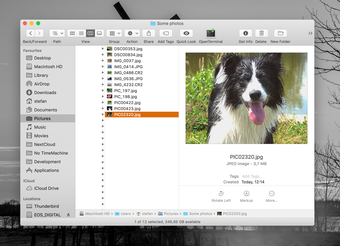
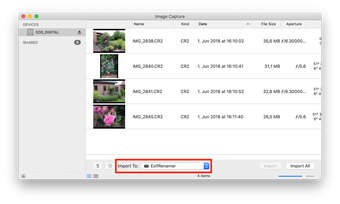
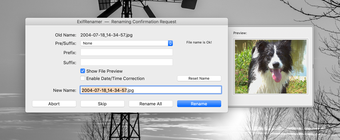
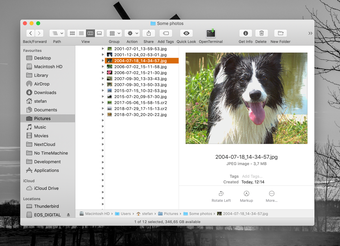
ExifRenamer is a free application designed for Mac users focused on photography. This tool simplifies the process of renaming image files by utilizing metadata from the EXIF data embedded in photographs. Users can quickly batch rename files based on various parameters such as date, time, and camera settings, enhancing organization and accessibility of photo libraries.

Unlock your creativity with Adobe Stock

Get 10 images or 1 video with a free trial

The application is user-friendly, featuring a straightforward interface that allows users to easily select images and apply renaming rules. ExifRenamer supports multiple file formats, ensuring versatility for different photography needs. This program is a valuable asset for photographers looking to streamline their workflow and maintain an orderly digital collection.


 0/6

App specs

  • Developer

  • License

    Free

  • Version

    2.4.0
  • Latest update

  • Platform

    Mac

  • OS

    Mac OS X

  • Language

    English

  • Downloads

    9.7K

    Last month's downloads

    • 7
  • Size

    7.27 MB

Program available in other languages


Icon of program: ExifRenamer

ExifRenamer for Mac

  • Free
  • 4.7
    9
  • 9.7K
  • V2.4.0
Free Download for Mac

View an ad to download for free


User reviews about ExifRenamer

4.7

3 reviews

Add review

Main reviews for you

  • Anonymous user

    It's a joke of a grumpy french (self-evident truth ;o). I'm angry !!! I gave much more skills than those above in my review ;o)Easy to use, many configuration capbilities, strength, and others... with respect to large volumes

  • Anonymous user

    I love it ;o). Very good and useful application in order to sort a lot of photos coming from several cameras. Pros: speedlittle size Cons: a little effort on interface. Application icon in the Dock is a too small target

  • Anonymous user

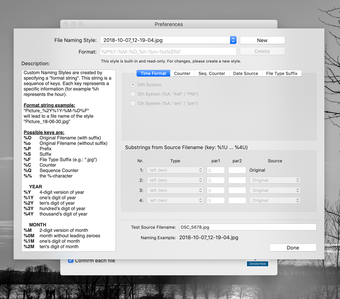
    Easy and Effective. It is very easy to modify and use on Mac. Pick or change preference for renaming then simply select, right click, and open with ExifRenamer to rename photos. The author put 'created hour-min-sec' to most of preset renaming style. I modified one of them and added sequential numbers instead. The modification window (Show Advanced Options) is very easy to understand and shows an example of a photo name as you change the style. Pros: Easy to useWorks great on Mac 10.8.4Renaming style modification Cons: none

More

You may also like

Alternatives to ExifRenamer

Explore Apps

Latest articles

Laws concerning the use of this software vary from country to country. We do not encourage or condone the use of this program if it is in violation of these laws.
Softonic

Is ExifRenamer safe?

100/100

Score result: Clean

This file passed a comprehensive security scan using VirusTotal technology. It is safe to download.

  • Virus free
  • Spyware free
  • Malware free
  • Verified by Security Partners

    VirusTotal logo

Scan Info

Last scan
Thursday, August 11, 2022
Scan provider
VirusTotal · Full report

File Integrity

File
ExifRenamer.dmg
SHA256
b49a84bb74c02065561d55a38002d4db62495dcbead41ac4b528e5ead12ece2c
SHA1
aa48745c80b58b60a1e8fc097f094aeb987bd9d0

Softonic security commitment

ExifRenamer has been thoroughly scanned by our advanced security systems and verified by industry-leading partners. This file comes from the official developer and has passed all our security checks, showing no signs of viruses, malware, or spyware. For more information, visit our Security and Trust Center

Signed in to Softonic as